Preface
Over the years, I’ve noticed a strange phenomenon: whether it’s an experienced veteran or a junior programmer, people love to talk about AI, Big Data, Blockchain, and various frameworks, but very few focus on databases. I’m not sure if it’s because databases seem too “low-end” or if they are just too low-profile.
Technology is like that: the areas you don’t focus on are the ones where you’re most likely to fall into a pit. So, I want to talk about how to avoid “pits” when using databases.
This chapter is divided into four sections:
- Why databases are important.
- Database usage tips.
- Common pitfalls in database design.
- Suggestions for further learning.
Why databases are important
Many developers don’t pay much attention to databases, following an “as long as it works” philosophy for table structures. However, in almost all Web development, most functional operations are essentially database operations. Whether you use Python, Java, or Ruby, you are basically “programming for the database.” Some framework authors even use ORM (Object Relational Mapping) to hide the database layer, treating it as a black box.
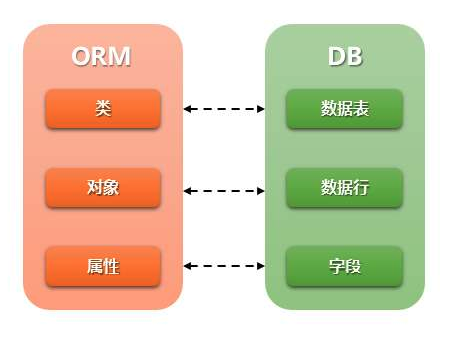
While ORMs simplify development, it is essential for programmers to understand how their SQL is executed. You need to use EXPLAIN to see if your SQL is efficient (scanned rows, index hits, sorting, etc.) and SHOW INDEX to see if your indexes are effective. SQL is a vital skill. Most commercial companies’ core assets are the data in their databases. If the system crashes, you can restart it; if the database is deleted or corrupted, a small business might go bankrupt.
As you grow from a novice to an expert and work on larger systems, the first bottleneck is often the database, not the CPU or RAM. Databases are disk-based, and disk I/O is slow (millisecond level). While full-table scans are fine for a few thousand rows, they will crash a server with millions of rows.
Impact of Database Design on the System
Good design:
- Reduces redundancy and avoids maintenance anomalies.
- Saves storage space and increases access speed.
Bad design:
- Causes anomalies in insertion, update, and deletion.
- Wastes space and slows down access.

For example, using an INT (4 bytes) for an age field when TINYINT (1 byte) would suffice is poor design. You might think space is cheap, but data grows. In a table with tens of millions of rows, poor design can waste hundreds of gigabytes, which is then multiplied across different data centers.
Database Usage Tips
Storage Engines
MySQL’s architecture is unique because it supports different storage engines. The most common ones are:
MyISAM:
- No transaction support, table-level locking, fast counts (
COUNT(*)). - Primarily for OLAP-type applications, suitable for logs and reports.
InnoDB:
- Row-level locking, high concurrency, supports transactions.
- Primarily for OLTP-type applications (standard business transactions).
Field Types
Junior programmers often choose field types haphazardly. Rules for selecting types:
- Prefer numeric fields: Use
INTfor primary keys instead ofVARCHARif possible. - Choose the smallest type that meets requirements: Use
TINYINTfor age or status. - Use TIMESTAMP instead of DATETIME:
TIMESTAMPis 4 bytes and supports UTC, whileDATETIMEis 8 bytes and doesn’t.
Why use the smallest field? InnoDB stores data in Pages (default 16KB). The smaller the row, the more rows fit in a page, significantly increasing performance.
Indexes
Indexes trade space for time. Most indexes are B-Tree indexes, designed for slow disk I/O. A B-Tree is short (usually no more than 3 levels), ensuring that an element is found in at most three disk reads.
Tips for using indexes:
- Indexes are not “the more, the better.” Too many indexes slow down writes.
- Don’t index columns with low cardinality (e.g., a “gender” column).
- Regularly maintain indexes and follow the “leftmost matching” rule.
- Use
EXPLAINto check if your SQL hits the index.Using indexin theExtracolumn is usually a good sign.
Common Pitfalls to Avoid
- Avoid Triggers and Stored Procedures: They make logic hard to understand and debug, and they move computation into the database where it scales poorly.
- Avoid Reserved Fields: You can’t predict future types, and they increase maintenance costs.
- Denormalization: It’s okay to violate the Three Normal Forms for performance (trading space for time).
- Avoid NULL fields:
NULLvalues can break indexes and make statistics complex. They also require extra logic in the application (likeif != nullchecks).
Finally
Good starting points for further learning:
- MySQL Technical Innards: InnoDB Storage Engine: Deep dive into how storage engines work.
- High Performance MySQL: The “Bible” of MySQL, covering almost everything.
- MySQL in Action: 45 Lectures (GeekTime): A practical, hands-on series by a database expert.